

The first day is done. The welcome email has been sent, the org chart uploaded, the first team meeting moderated. And then? Two weeks later, a new colleague asks how last November's quarterly townhall went — the one where the leadership team presented the new strategy. The answer: "There's a recording somewhere."
This is not the exception. According to Gallup, only 12% of employees say their organisation did a great job with onboarding. 40% of new hires leave within the first 90 days — often not because of the role itself, but because they never felt truly connected (Forbes).
The problem is rarely a lack of good intentions. It is a structural one: onboarding in most organisations is a one-time process, not a permanent system. Knowledge gets sent once — and then you hope it sticks.
This guide shows how webcasts and video become the foundation of scalable, searchable employee onboarding — one that works even for people who join a year from now.
Why structured onboarding determines retention and performance
Onboarding is not an HR formality. It is a business decision.
The data is unambiguous: organisations with structured onboarding programmes achieve 82% higher employee retention (Glassdoor). The productivity of new hires increases by 60% (SHRM). And employees who experience a positive onboarding journey are 18 times more committed to their employer than those who do not (BambooHR).
The cost on the other side of the ledger: replacing an employee can cost up to 213% of their annual salary (Work Institute, 2025). The average cost per hire alone is nearly $4,700 (SHRM). And 40% of all turnover happens within the first 90 days — before a person has even been fully onboarded.
The key insight: Onboarding quality is not a question of care. It is a question of economics. Every person lost in the first few weeks costs more than the entire investment in a structured onboarding system.
What new employees actually need in their first 90 days
What new joiners look for in their first three months can be distilled into three categories:
Context: What is the company? What are the current goals? How has leadership communicated in the past? New employees need the strategic frame — not as a PDF, but as a lived narrative.
Process knowledge: How does a project run? Who is responsible for what? Which tools are used how? This is the knowledge that lives in people's heads and 1:1 briefings — and disappears when the person who holds it leaves.
Belonging: Leadership voices, cultural moments, genuine insight into how the organisation works. People do not stay because of a job description — they stay because of a feeling.
All three categories share one thing: they can be distilled from existing webcasts and videos — if the organisation has built an infrastructure that makes this knowledge accessible.
Video onboarding: what the research shows
Video increases information retention by 67% compared to purely text-based content (UrbanBound). The reason lies in cognitive processing depth: sound, visuals and spoken language activate more neural channels than a document.
And yet: 72% of employees say video training improves their onboarding experience — but only 23% of organisations actually use video in their onboarding process (Brightcove, 2024). This gap between effectiveness and adoption is exactly where organisations gain a measurable advantage in the talent market.
For onboarding this means: a CEO statement experienced on video is more accessible three weeks after the start date than an email summary of the same message.
Organisations using AI-powered technology in onboarding report 50% faster time-to-productivity (Gartner, 2025). And 81% of companies plan to invest specifically in onboarding technology in 2025 (Forbes).
The problem: many of these investments land in isolated systems — an LMS here, a SharePoint folder there, a Teams recording somewhere else. What is missing is a coherent, searchable system.
The scaling problem: why classical onboarding hits its limits
Most onboarding processes work — once, for one person, with enough available support. The problem starts when the organisation grows, when teams are distributed across locations, or when new employees join remotely and asynchronously.
The scaling problem in one sentence: Classical onboarding depends on personal availability — and personal availability does not scale.
The four most common weaknesses in practice:
Knowledge loss through people dependency: The deepest organisational knowledge lives in the heads of experienced team members. When that person leaves, the knowledge goes with them. When they are on holiday, onboarding is paused.
Inconsistency through informal processes: New employees receive different information depending on their manager and team. Those who are lucky get a good onboarding partner. Those who are not navigate alone.
Passive archiving instead of active accessibility: Recordings of town halls, training sessions and kick-offs end up in drives that nobody can find. Searching for a specific moment in a 60-minute recording is too burdensome — so it never gets used.
No measurement, no optimisation: Running onboarding as a personal process means you cannot measure which content was understood. What cannot be measured cannot be improved.
Building a digital onboarding campus: step by step
The core concept is simple: do not produce new content — make existing content accessible.
Every organisation that regularly runs webcasts, town halls, compliance trainings or product updates is already producing content that is highly relevant for new employees. The problem is not missing material — it is missing structure.
Step 1: Build the onboarding inventory
Start with an audit. Which existing webcasts, recordings and videos are relevant for new employees?
| Content type | Example | Onboarding relevance |
|---|---|---|
| Strategic communication | CEO townhall Q1 | Company direction, leadership style |
| Compliance training | GDPR mandatory training | Legal foundation, audit trail |
| Product knowledge | Feature launch webcast | Product understanding, messaging |
| Culture and values | Annual kick-off event | Belonging, cultural understanding |
| Process knowledge | Workflow training | Operational know-how |
The result: a curated inventory from which a 30-60-90-day onboarding path can be built.
Step 2: Structure content with AI
A recording without structure is a passive archive. With AI-generated chapter marks and transcripts, it becomes an active learning resource.
In practice, this means:
- Automatic chapter marks break a 60-minute town hall into navigable segments. New employees jump directly to the section relevant to their role.
- Full transcripts make all content searchable. Anyone who wants to know what was said about pricing in the Q2 update types it in — and gets the timestamp.
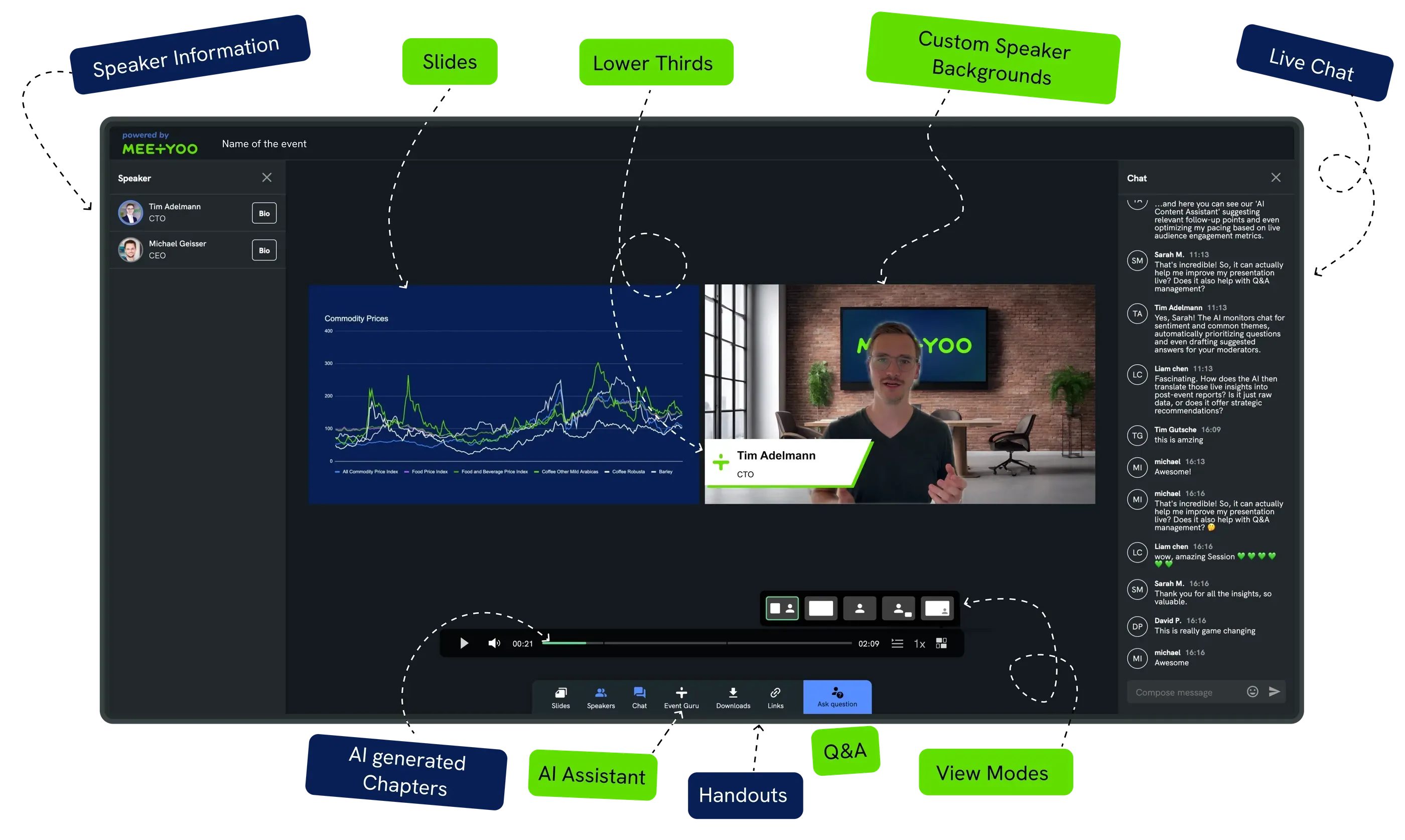
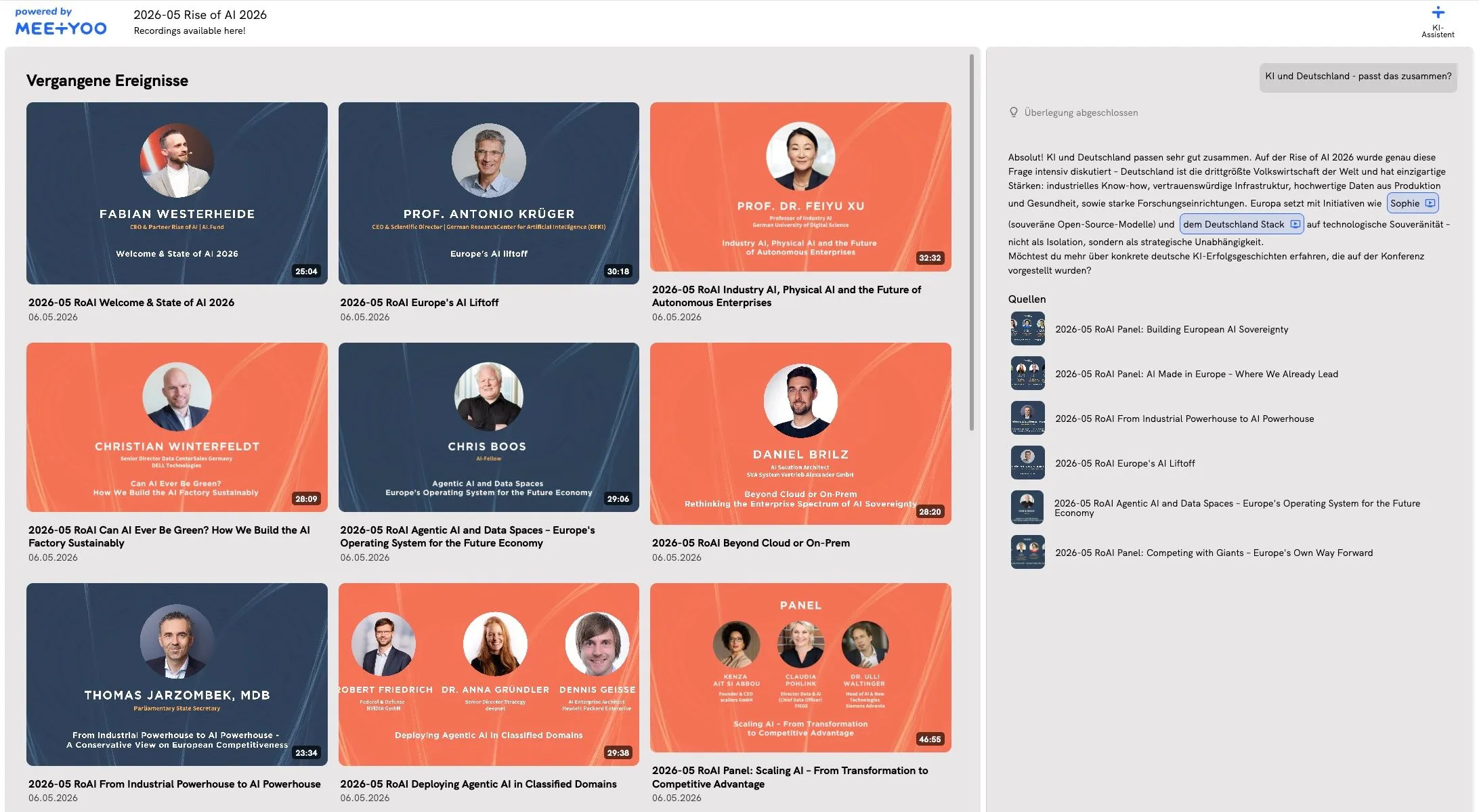
- Chat with Webcast turns the recording into a knowledge assistant: new employees ask questions in natural language and receive answers with a direct link to the relevant moment in the video.
Real-world example: A new marketing hire wants to know which messages were communicated at the last product launch. Instead of scrubbing through 45 minutes of recording, they type: "What were the three key messages at the launch of Product X?" — and receive an answer with a timestamp link.
Step 3: Define the 30-60-90-day path
A curated onboarding path gives new employees orientation without overwhelming them. Content is staged over time, sorted by role and relevance.
First 30 days — context and culture:
- CEO statement clip from the last town hall (3–5 min.)
- Company culture and values (from annual kick-off)
- Mandatory compliance training (GDPR, information security)
- Introduction to the most important internal processes
Days 31–60 — product and process knowledge:
- Relevant product trainings and feature updates
- Department-specific workflows
- Q&A archive from the last all-hands, filtered by topic
Days 61–90 — strategic context:
- Quarterly review and strategic roadmap
- Selected excerpts from leadership communication
- Investor relations update (where relevant to the role)
Step 4: Structure access and permissions
Not all content is equally relevant for all employees — and not all content is appropriate for all areas of the organisation. A professional onboarding platform allows role-based access control: specific webcasts are only visible to specific teams or locations.
SSO integration via Azure AD and OIDC ensures that access is automatically synchronised with the corporate directory. New employees have access from day one — without manual setup by IT.
Step 5: Measure and optimise
A digital onboarding system delivers data that a personal process never can: which content is accessed most frequently by new employees? At which segments do they ask questions — a signal for comprehension gaps? How does engagement differ by location or department?
This data enables continuous optimisation: content that goes unused gets replaced. Topics that generate many questions get more depth.
MEETYOO Show: your AI-powered onboarding campus
MEETYOO Show was not built as an LMS — and that is exactly the advantage.
While dedicated learning management systems create isolated course structures, MEETYOO Show connects live events and on-demand archives seamlessly. Every webcast that runs through the platform automatically becomes a building block of the onboarding campus — no export, no upload, no manual post-processing required.
The AI features that transform onboarding
Chat with Webcast — the knowledge assistant that knows every event by heart
New employees ask questions directly to the recording — in natural language. The answer comes with a timestamp link that leads directly to the relevant moment in the video. No scrubbing, no searching: knowledge on demand.
Automatic chapter marks — orientation without effort
A few minutes after the event ends, chapter marks appear based on the transcript. A 90-minute town hall becomes a navigable knowledge unit: new employees jump directly to the section that answers their question.
Full transcript — searchable, downloadable, linkable
Every spoken word is transcribed and searchable across the platform — and simultaneously usable for compliance documentation and internal knowledge management.
Key-moments detection — the most important statements at a glance
AI identifies moments with particular speaker emphasis and high audience engagement. Communications teams see which statements had impact — and can extract these moments as standalone clips for the onboarding campus.
The platform philosophy: MEETYOO Show connects live event and permanent asset. A CEO town hall streamed live today is a searchable onboarding document tomorrow — without any additional effort.
Enterprise security for sensitive onboarding content
Onboarding content often touches sensitive areas: internal strategies, compliance training, financial communication. MEETYOO Show is ISO/IEC 27001:2022-certified, fully GDPR-compliant, and hosts all data exclusively on EU servers in Germany.
The fact that the German Federal Office for Information Security (BSI), the Federal Foreign Office and leading DAX companies trust MEETYOO is the direct result of this security architecture — not a marketing claim.
→ All MEETYOO Show AI features at a glance
→ Engagement features: Q&A, polls, chat and more
Use cases: how three company types are rethinking onboarding
Mid-sized company with multiple locations
A manufacturing company with 800 employees across five locations onboards 80–100 new people each year. Previously: individual briefings by team leads, inconsistent information levels, high time investment for everyone involved.
With MEETYOO Show, every quarterly town hall is automatically added to the onboarding archive. Compliance training runs once — and is then permanently available as a searchable on-demand video. New employees complete their 30-60-90-day path at their own pace, independently of location or manager availability.
Financial services firm with high compliance requirements
A bank with strict regulatory requirements must document and demonstrate onboarding content. Mandatory training must be verifiably completed by all employees.
MEETYOO Show delivers: attendance tracking with timestamps, audit-proof recordings, access logs and export functions for compliance reports. ISO 27001 certification and GDPR-compliant data storage exclusively in Germany satisfy the most stringent requirements.
Technology company with a remote-first culture
A software company with 300 employees across twelve countries cannot run location-based onboarding. With MEETYOO Show, the onboarding archive is accessible at any time from anywhere. Chat with Webcast answers questions based on existing transcripts — without time zone issues, without availability dependencies.
MEETYOO vs. the most common alternatives
| Approach | What it delivers | What is missing |
|---|---|---|
| SharePoint / file drive | Simple storage | No AI search, no navigation, no interactivity |
| LMS (e.g. Moodle, Cornerstone) | Course structure | No seamless live event connection, high maintenance effort |
| Microsoft Teams recordings | Recording available | No chapter marks, no chat-with-video, automatic deletion after 60 days |
| Zoom recording | Simple storage | No searchable archive, no AI features, no permanent storage |
| MEETYOO Show | Live event + AI archive + Chat with Webcast | Requires intentional onboarding design — that is what this guide is for |
SharePoint and file drives store videos — but not as active knowledge media. Anyone searching for a specific statement in a 60-minute recording has to scrub through it manually. Nobody does this.
LMS systems provide course structures — but they are decoupled from live event operations. Every town hall must be manually processed, uploaded and linked. That takes time that rarely exists.
Microsoft Teams recordings are deleted by default after 30–60 days — an operational time bomb for any onboarding archive.
The decisive difference: A recording is a backup. A MEETYOO archive is a living knowledge ecosystem — AI-powered, permanently accessible, GDPR-compliant.
→ Why your choice of webinar tool determines your data compliance
Common problems — and how to solve them
Even well-designed onboarding systems run into typical obstacles in practice. Here are the most common — and how to address them.
"We don't have time to prepare content." This is the most widespread misconception. A MEETYOO onboarding archive is not built through additional production — it is built by leveraging events that are already happening. Every webcast that takes place anyway automatically becomes an onboarding asset: transcript, chapter marks and summary are generated by AI, not by manual effort.
"Our employees don't watch recordings." That is true for passive storage — not for active knowledge media. The difference is accessibility: when a new hire can ask a question and receive an answer with a direct timestamp link, they use the system. When they have to scrub through 60 minutes, they do not.
"We don't know which content is relevant." Start with the onboarding inventory from Step 1 of this guide. The simplest rule of thumb: what would be the first question a new person in this role would ask? Then find the event that answers it. Five to seven curated pieces of content are enough to start — completeness is not the goal, relevance is.
"Our IT department blocks new tools over data protection concerns." MEETYOO Show is ISO/IEC 27001:2022-certified, GDPR-compliant and hosts all data on EU servers in Germany. SSO integration via Azure AD and OIDC is available. This combination satisfies the requirements of even the most restrictive IT and compliance teams in regulated industries.
Getting started tip: Do not aim for the perfect system — start with one event. Record your next town hall, let the AI generate chapters and a transcript, and share the link with three new employees. The feedback from that first test is worth more than any planning phase.
Conclusion: onboarding is not an event — it is a system
Onboarding rarely fails because of missing content. It fails because of systems that archive knowledge passively instead of making it actively accessible.
Every webcast that runs through MEETYOO Show automatically becomes a building block of a scalable onboarding campus: searchable, navigable, AI-powered, and GDPR-compliant. New employees find the answer to their question — not by watching 60 minutes of recording, but directly at the moment that answers it.
MEETYOO Show is available with the Forever Free Plan — permanently free, no expiry date, no credit card required. All AI features included.
FAQ
How does MEETYOO Show differ from an LMS for onboarding?
An LMS is a course system: you build learning paths manually and fill them with separate content. MEETYOO Show connects live events and permanent archives seamlessly — every webcast automatically becomes a searchable onboarding asset without manual uploading. Ideal for organisations that already run regular webcasts, town halls or trainings and want to actively leverage that content.
How long are recordings available in MEETYOO Show?
MEETYOO Show recordings have no automatic expiry date — they remain permanently available as on-demand assets. By contrast, Microsoft Teams recordings are deleted by default after 30–60 days. For onboarding purposes, permanent availability is essential.
Is MEETYOO Show GDPR-compliant for sensitive onboarding content?
Yes. MEETYOO Show is ISO/IEC 27001:2022-certified and hosts all data exclusively on EU servers in Germany. Access logs, attendance tracking and role-based permissions satisfy the strictest requirements even in regulated industries such as financial services, pharmaceuticals and the public sector.
Which content works best for an onboarding library?
The most impactful content includes: CEO town hall excerpts (leadership context, strategy), mandatory compliance training (GDPR, information security), product and feature training, and annual kick-off events for cultural onboarding. The key is curation: not every recording needs to be part of the onboarding path — only the ones that deliver real contextual value for new employees.
How do you set up a 30-60-90-day onboarding path with MEETYOO?
The path starts with curating existing webcasts by topic relevance and onboarding phase. Chapter marks, automatically generated by the MEETYOO AI, make content navigable. Chat with Webcast allows new employees to ask targeted questions without watching a full recording. The setup is browser-based and can be managed by communications or HR teams directly — no IT resources required.
Can MEETYOO Show be connected to our SSO and Active Directory?
Yes. MEETYOO Show supports SSO integration via Azure Active Directory and OpenID Connect (OIDC). New employees automatically gain access to their permitted onboarding content using their corporate login — without manual setup by IT.
What does MEETYOO Show cost for an onboarding use case?
The Forever Free Plan is permanently free — no expiry date, no credit card. It includes all AI features, up to 500 registrations per event and up to 10 hours of on-demand content. For larger onboarding archives and enterprise requirements (SSO, unlimited content, dedicated support), Starter and Enterprise plans are available.


